

Traditional Chinese (正體中文,zhèngtǐ zhōngwén) on Android is not hard, but it can feel weird the first time, like your phone is hiding the good buttons on purpose. The good news: once you set up the right keyboard, you can type 中文 (zhōngwén), choose the right characters, and stop fighting your phone like it owes you money.
By the end of this guide, you’ll know how to switch your Android keyboard to Traditional Chinese, type in pinyin, pick the right characters, and avoid the most annoying beginner mistakes. You’ll also learn useful tech vocabulary in Traditional Chinese, because “keyboard settings” is a very real part of language life now. Love that for us.
For a general Taiwan-language learning path, you can also look at the main guide at Traditional Chinese learning resources.
Useful Tech Words You’ll See A Lot
Before the setup, let’s learn the basic words. These show up in menus, help pages, and app settings all the time.
| Traditional Chinese | Pinyin | English Meaning | Example (ZH) | Example (Pinyin) | Translation (EN) |
|---|---|---|---|---|---|
| 手機 | shǒujī | mobile phone | 我的手機沒有電了。 | Wǒ de shǒujī méiyǒu diàn le. | My phone has no battery left. |
| 鍵盤 | jiànpán | keyboard | 我想換中文鍵盤。 | Wǒ xiǎng huàn Zhōngwén jiànpán. | I want to change to a Chinese keyboard. |
| 輸入法 | shūrùfǎ | input method | 這個輸入法很好用。 | Zhège shūrùfǎ hěn hǎoyòng. | This input method is very useful. |
| 設定 | shèdìng | settings | 我去設定裡找鍵盤。 | Wǒ qù shèdìng lǐ zhǎo jiànpán. | I’m going into settings to find the keyboard. |
| 語言 | yǔyán | language | 我想加中文語言。 | Wǒ xiǎng jiā Zhōngwén yǔyán. | I want to add Chinese language. |
| 繁體中文 | fántǐ zhōngwén | Traditional Chinese | 我用繁體中文打字。 | Wǒ yòng fántǐ zhōngwén dǎzì. | I type in Traditional Chinese. |
| 簡體中文 | jiǎntǐ zhōngwén | Simplified Chinese | 我不要簡體中文。 | Wǒ bú yào jiǎntǐ zhōngwén. | I do not want Simplified Chinese. |
| 注音 | zhùyīn | Bopomofo / Zhuyin | 台灣很多人用注音。 | Táiwān hěn duō rén yòng zhùyīn. | Many people in Taiwan use Zhuyin. |
| 拼音 | pīnyīn | pinyin | 我用拼音輸入。 | Wǒ yòng pīnyīn shūrù. | I input using pinyin. |
| 字 | zì | character | 請選正確的字。 | Qǐng xuǎn zhèngquè de zì. | Please choose the correct character. |
Step 1: Open Your Keyboard Settings
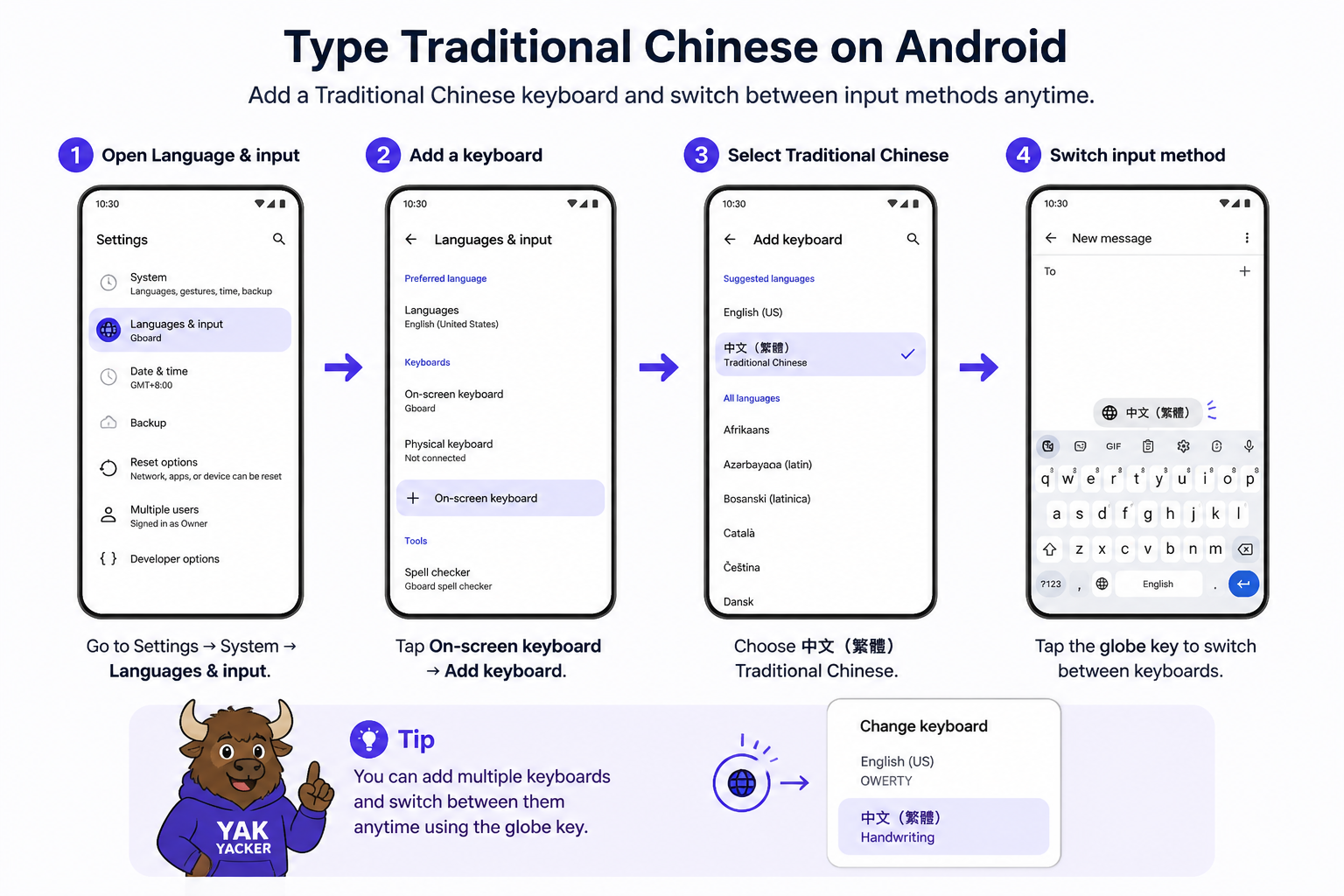
On most Android phones, you need to go into Settings (設定,shèdìng), then find Language & Input or keyboard settings. Different brands love different menus, because apparently one neat system would be too easy.
Look for words like 鍵盤 (jiànpán), 輸入法 (shūrùfǎ), or 語言 (yǔyán). If your phone is in English, the menu may still show a Chinese keyboard option after you add it.
| Pattern | Meaning | Example (ZH) | Pinyin | English |
|---|---|---|---|---|
| 設定 → 語言與輸入 | Settings → Language & input | 我在設定裡找語言與輸入。 | Wǒ zài shèdìng lǐ zhǎo yǔyán yǔ shūrù. | I’m looking for Language & input in Settings. |
| 新增鍵盤 | Add keyboard | 我想新增中文鍵盤。 | Wǒ xiǎng xīnzēng Zhōngwén jiànpán. | I want to add a Chinese keyboard. |
| 選擇輸入法 | Choose input method | 請選你要的輸入法。 | Qǐng xuǎn nǐ yào de shūrùfǎ. | Please choose the input method you want. |
If you are using a Google-style keyboard, the settings may be inside the keyboard app itself. The exact path changes by phone model, so yes, you do need to do a little treasure hunt. Very glamorous.
Step 2: Add Traditional Chinese Input
Now add a Chinese keyboard or input method. The two most common ways are 拼音 (pīnyīn) and 注音 (zhùyīn). For many learners, pinyin is the easiest start. For many Taiwan users, Zhuyin is the usual local choice.
When you see a Chinese language option, make sure it says 繁體中文 (fántǐ zhōngwén) or a Taiwan Traditional Chinese option, not 簡體中文 (jiǎntǐ zhōngwén). That tiny detail matters a lot if you want the right script.
| Traditional Chinese | Pinyin | Meaning | Example (ZH) | Example (Pinyin) | Translation (EN) |
|---|---|---|---|---|---|
| 繁體中文 | fántǐ zhōngwén | Traditional Chinese | 我只想用繁體中文。 | Wǒ zhǐ xiǎng yòng fántǐ zhōngwén. | I only want to use Traditional Chinese. |
| 簡體中文 | jiǎntǐ zhōngwén | Simplified Chinese | 請不要選簡體中文。 | Qǐng bú yào xuǎn jiǎntǐ zhōngwén. | Please do not choose Simplified Chinese. |
| 注音 | zhùyīn | Bopomofo / Zhuyin | 我也想試試注音。 | Wǒ yě xiǎng shìshì zhùyīn. | I also want to try Zhuyin. |
| 拼音 | pīnyīn | Pinyin input | 我先用拼音學打字。 | Wǒ xiān yòng pīnyīn xué dǎzì. | I’ll start by learning to type with pinyin. |
For a boring but reliable reference on Chinese writing systems, you can check Traditional Chinese characters on Wikipedia. Yes, Wikipedia is not fancy, but it gets the job done like a sensible pair of shoes.
Step 3: Switch To The Traditional Keyboard
Once the keyboard is added, switch to it from the keyboard icon, globe icon, or language button. On some phones, you press and hold the space bar or tap the little keyboard symbol. Then choose the Chinese keyboard you want.
If you see multiple Chinese options, choose the one marked Traditional Chinese. If your keyboard offers region choices, Taiwan is usually the safest bet for Traditional Chinese learners because the vocabulary and character choices often match Taiwan usage better.
Here is a tiny reality check: if the keyboard shows the right language but the wrong script, you have not failed. You just picked the wrong option. Phones are very committed to making this confusing in a medium-interesting way.
Step 4: Type In Pinyin And Pick Characters
Typing in Chinese often means you type the sound in pinyin first, then choose the correct character from a list. For example, type nihao to get 你好 (nǐ hǎo).
| Traditional Chinese | Pinyin | Meaning | Example (ZH) | Example (Pinyin) | Translation (EN) |
|---|---|---|---|---|---|
| 你好 | nǐ hǎo | hello | 你好,我是新手。 | Nǐ hǎo, wǒ shì xīnshǒu. | Hello, I’m a beginner. |
| 謝謝 | xièxie | thank you | 謝謝你幫我設定鍵盤。 | Xièxie nǐ bāng wǒ shèdìng jiànpán. | Thanks for helping me set up the keyboard. |
| 請問 | qǐngwèn | excuse me / may I ask | 請問,中文鍵盤在哪裡? | Qǐngwèn, Zhōngwén jiànpán zài nǎlǐ? | Excuse me, where is the Chinese keyboard? |
| 沒問題 | méi wèntí | no problem | 沒問題,我可以幫你。 | Méi wèntí, wǒ kěyǐ bāng nǐ. | No problem, I can help you. |
| 可以 | kěyǐ | can / okay | 這個方法可以嗎? | Zhège fāngfǎ kěyǐ ma? | Can I use this method? |
| 不行 | bù xíng | not okay / cannot | 這個按鈕不行。 | Zhège ànniǔ bù xíng. | This button does not work. |
Notice the tone change in 你好 (nǐ hǎo): both words keep their third-tone shape in writing, but in natural speech the first 你 often sounds a bit lighter before 好. Don’t panic. The keyboard does not care, but your ears will eventually.
Step 5: Use Prediction And Character Selection
Chinese keyboards usually show predictive suggestions. This is the part where you type a sound and then tap the right word or character. If you type shi, you