
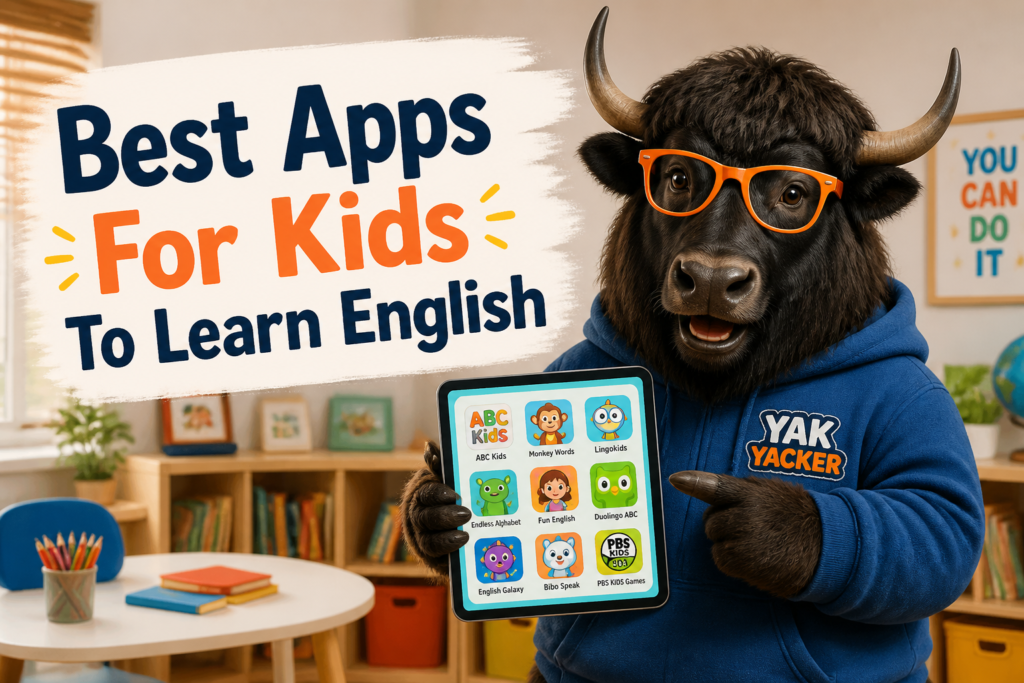
English apps for kids can be genuinely useful, which is a nice change from the usual “educational” app that is really just a flashy button factory. The best ones feel like play, but quietly teach vocabulary, listening, pronunciation, reading, and simple speaking skills.
If a child can tap, listen, repeat, and get instant feedback, English starts to feel less like homework and more like a game. That is the sweet spot. The trick is choosing apps that are fun and actually teach something useful.
This guide explains what to look for in the Best Apps For Kids To Learn English, how different app types help, and which learning features matter most by age and level.
Small, regular practice beats one giant “English session” that ends with tears, snacks, and mysterious silence.
What Makes A Good English App For Kids?
Not every app with a cartoon owl and cheerful music is a good language-learning tool. A strong app should help a child hear English, see English, and use English in short, simple ways.
- Clear audio — kids need to hear words slowly and clearly.
- Simple interface — fewer menus, fewer distractions, fewer accidental “settings adventures.”
- Fun repetition — the app should review words often without feeling boring.
- Visual support — pictures help kids connect meaning with words.
- Short activities — young learners focus better with quick tasks.
- Speaking practice — even basic repetition helps pronunciation.
- Progress tracking — parents and teachers can see what was learned.
- Safe content — no weird ads, no confusing chat, no surprise internet nonsense.
For general learning goals and level ideas, it can help to compare progress with simple standards like CEFR. A boring but useful starting point is the Learn English hub, which can help families think about level and next steps.
Best App Types For Kids
Different apps do different jobs. The best choice depends on the child’s age, attention span, and English level. A 5-year-old does not need the same app as a 12-year-old preparing for school English.
| App Type | Best For | What It Teaches | Why It Helps |
|---|---|---|---|
| Picture vocabulary apps | Beginners and young children | Words for animals, colors, food, numbers, and toys | Easy visual learning with simple repetition |
| Listening-and-repeat apps | Young learners who are ready to speak | Pronunciation, rhythm, and short phrases | Kids copy native-like audio |
| Story apps | Children who like reading and listening | Basic reading, comprehension, and common phrases | English appears in a real context |
| Game-based grammar apps | Older kids and beginners with some confidence | Word order, verb forms, and sentence patterns | Grammar feels less scary and more playable |
| Phonics apps | Early readers | Letter sounds and spelling patterns | Helps children decode new words |
| Conversation apps | Intermediate kids | Speaking, listening, and simple responses | Builds confidence in real English use |
Useful Features To Look For
Here are the features that usually matter most when choosing the Best Apps For Kids To Learn English. These are the things that separate a smart learning app from a noisy toy with vocabulary stickers.
| Feature | Why It Matters | What To Check |
|---|---|---|
| Native audio | Kids learn pronunciation by listening closely | Clear voices, not robotic speech |
| Picture matching | Supports memory and meaning | Word-to-image tasks and visual quizzes |
| Spaced review | Helps words stay in long-term memory | Words come back again after a few days |
| Speech practice | Encourages speaking, not just tapping | Repeat-after-me or voice recognition |
| Age-appropriate design | Keeps the child engaged without frustration | Big buttons, simple navigation, friendly visuals |
| Offline use | Useful for travel and quiet time | Download lessons or access offline activities |
| Parent controls | Helps adults manage screen time and progress | Reports, timers, or lesson limits |
Best Apps By Learning Goal
It helps to think in goals, not just app names. A child may need vocabulary first, then pronunciation, then reading, then short sentences. English learning is not a race, even if some apps pretend it is.
| Learning Goal | Good App Style | What Kids Practice | Example Activity |
|---|---|---|---|
| Learn basic words | Picture vocabulary app | Colors, animals, food, school objects | Match “apple” to a picture |
| Improve pronunciation | Speaking or phonics app | Sounds, stress, simple words | Repeat “rabbit” and get feedback |
| Understand short sentences | Story or listening app | Listening and meaning | Choose the correct picture after a sentence |
| Build reading skills | Reading and story app | Word recognition and simple texts | Read a short story about animals |
| Practice grammar | Game-based grammar app | Sentence order and verb forms | Put “She is playing” in the right order |
| Use English in context | Conversation or interactive app | Short replies and simple speaking | Answer “What is your name?” |
Ten Kid-Friendly English App Features Explained
Below are common features found in strong kids’ English apps. These are the words parents and teachers often see in app descriptions, and yes, some of them are marketing fluff. A little caution is healthy.
| Feature | Pronunciation | Meaning | Example Sentence | Learner Note |
|---|---|---|---|---|
| Vocabulary | vak-AB-yoo-lair-ee | Words you know and use | The app teaches vocabulary for animals and food. | Good beginner apps repeat vocabulary often. |
| Pronunciation | pruh-nun-see-AY-shun | The way a word sounds | She practices pronunciation with the app. | Children copy sounds best with clear audio. |
| Listening | LIS-uh-ning | Understanding spoken English | Listening games help kids understand short phrases. | Listening should come before long speaking tasks. |
| Phonics | FON-iks | Letter sounds and spelling patterns | Phonics apps help children read new words. | Very useful for early readers. |
| Flashcards | FLASH-kardz | Cards with words and pictures for review | We use flashcards to practice classroom words. | Simple, but surprisingly effective. |
| Review | ree-VYOO | Practice something again | The app gives a review after each lesson. | Review is where memory gets stronger. |
| Levels | LEV-uhlz | Different stages of difficulty | The app has levels for beginners and older kids. | Levels should feel challenging but not stressful. |
| Rewards | rih-WORDZ | Points, stars, or prizes in the app | Rewards keep children motivated. | Fun, but the English should still be the real goal. |
| Stories | STOR-eez | Short reading or listening texts | Stories help children learn words in context. | Great for kids who like a simple plot. |
| Conversation | kon-ver-SAY-shun | Speaking with another person or app | Conversation practice builds confidence. | Short, simple lines work best for kids. |
Common Phrases You’ll See In Kids’ English Apps
These phrases often appear in app menus, lesson screens, and instructions. Knowing them makes the app easier to use, which is helpful because children are not the only ones who get confused by tiny buttons and random icons.
| Phrase | Pronunciation | Meaning | Example Sentence | Learner Note |
|---|---|---|---|---|
| Tap to listen | tap too LIS-uhn | Press to hear the audio | Tap to listen and repeat the word. | Very common in beginner apps. |
| Repeat after me | rih-PEET AF-ter mee | Say the word or sentence again with the speaker | The app says, “Repeat after me.” | Great for pronunciation practice. |
| Match the picture | match thuh PIK-cher | Choose the correct image | Match the picture to the word. | Helpful for word recognition. |
| Choose the correct answer | chooz thuh kuh-REKT AN-ser | Select the right option | Choose the correct answer to move on. | Common in quizzes. |
| Try again | trai uh-GEN | Do it one more time | Try again if the answer is wrong. | Important for learning, not failure. |
| Well done | wel dun | Praise for success | The app says, “Well done!” | Positive feedback helps kids stay engaged. |
| Next lesson | nekst LES-uhn | The following activity | Click next lesson when you finish. | Good apps move in small steps. |
| Daily practice | DAY-lee PRAK-tis | Short practice every day | Daily practice builds habits. | Ten minutes a day is often enough for young learners. |
American And British English Differences In Kids’ Apps
Most apps use American English by default, especially if they are made for a global market. That means children may see words like color instead of colour, or hear trash instead of rubbish.
| American English | British English | Example | Learner Note |
|---|---|---|---|
| color | colour | My favorite color is blue. | Spelling difference only. |
| truck | lorry | The truck is red. | Different everyday word. |
| trash | rubbish | Put the paper in the trash. | Common in app vocabulary lists. |
| pants | trousers | He wears blue pants. | Be careful: in British English, “pants” can mean underwear. |
| soccer | football | She likes soccer. | Same sport, different name. |
If an app offers both varieties, that is a bonus. If not, no problem. Consistency matters more than trying to teach every version at once.
Simple Rules For Choosing The Right App By Age
Age matters, but attention span matters even more. A child who loves stories may be ready for reading earlier than a child who prefers songs or movement.
- Ages 3–5: choose picture-based, touch-friendly apps with songs, colors, animals, and very short activities.
- Ages 6–8: look for phonics, easy reading, simple listening, and vocabulary games.
- Ages 9–12: choose apps with short sentences, story tasks, grammar games, and speaking practice.
- Teens: use apps with more reading, listening, real-life topics, and progress tracking.
A good rule: younger children need more pictures and fewer instructions. Older children can handle more language, but they still want the app to feel fun. Nobody enjoys a digital worksheet wearing a party hat.
How To Use An English App Well
The app is only part of the learning. A good routine makes a huge difference. Ten focused minutes can beat forty distracted minutes every single time.
- Use the app at the same time each day.
- Keep sessions short and regular.
- Repeat words aloud, not only in your head.
- Ask the child to point to objects at home after learning them.
- Mix app time with real-life practice.
- Celebrate small wins, like remembering five new words.
Apps teach best when they are part of a routine, not a one-time miracle. Sorry. The miracle part is still in development.
Mini Practice: Can You Match The Goal?
Read the learning goal and choose the best app type. This is a quick way to think like a smart learner, not just a hopeful downloader.
- Goal: learn animal words → Best app type: picture vocabulary app
- Goal: say words more clearly → Best app type: pronunciation or phonics app
- Goal: understand short stories → Best app type: story app
- Goal: practice sentence order → Best app type: grammar game app
- Goal: answer simple questions → Best app type: conversation app
Common Mistakes Parents Make When Choosing Apps
These mistakes are very common. The good news: they are also easy to fix.
| Mistake | Why It Causes Problems | Better Choice |
|---|---|---|
| Choosing the flashiest app | Looks fun but may not teach much | Choose one with clear learning goals |
| Using an app that is too hard | The child gets frustrated and quits | Start with easier levels and simple words |
| Expecting fast results | Language learning takes time | Focus on steady weekly progress |
| Ignoring pronunciation audio | Words may be learned with the wrong sound | Pick apps with clear native-speaker audio |
| Letting kids tap randomly | They play, but do not learn | Use short guided sessions |
| Using only one app forever | The child may miss other skills | Mix vocabulary, listening, reading, and speaking |
How To Check If An App Is Actually Helping
Try this simple test after two or three weeks of regular use:
- Can the child remember new words without looking?
- Can the child say the words more clearly?
- Can the child understand short instructions in English?
- Can the child read or recognize familiar words?
- Does the child still seem willing to use the app?
If the answer is mostly yes, the app is doing its job. If not, the app may be too hard, too easy, or just too shiny for its own good.
For a more structured level check, families can also use the English Placement Test CEFR and the English Vocabulary Test to get a simple idea of what the learner already knows.
Quick Reference Summary
- Choose apps with clear audio, simple design, and age-appropriate lessons.
- Look for vocabulary, listening, pronunciation, reading, and speaking practice.
- Young children need pictures and repetition.
- Older children can handle stories, grammar games, and conversation.
- Short daily practice works better than long, random sessions.
- Good English apps should teach real words, not just hand out cartoon stars.
For a reliable learner reference, the word app is commonly used for “application” in modern English, especially on phones and tablets. That tiny word does a lot of work.
Yak Takeaway: The best apps for kids to learn English are the ones that are simple, clear, and regular. Fun is important. Learning is more important. The magic is in the combination.